--Jan 11th, 2025--
Today I attempted to get claude.ai to spit out a simple Fyne app example showing how to
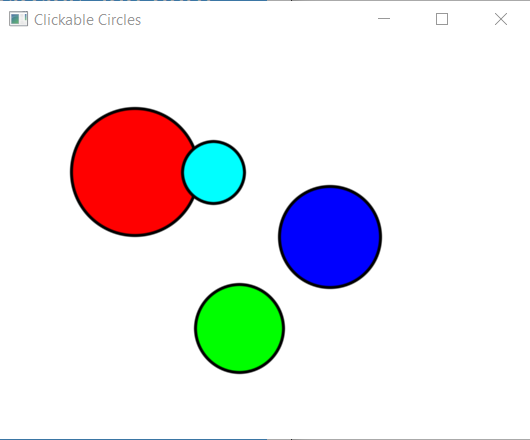
display a few circles and note the coordinates when I clicked one of them.
Below is the modified third attempt, which worked but didn't account for circles that overlap. Without adding z coordinates to a purely 2D example, I couldn't get which circle is on top (the last one drawn, but I could modify it to spit out which circles that the click was within the distance radius from the circle center.
Adding a bool (wasClicked) to the Tapped function, setting it to true if distance was within a circle, and only returning out if there was a circle clicked before giving coords on the background (for a miss) did the trick. Added a cyan circle (mixed red and blue) and positioned it over the red circle. Voila, clicks on it also got the red circle too when clicking in the sliver of cyan circle that is over the red one. Only in the app, not on this web page though.
Tuesday, Jan 26th, 2005
I did get a working version of this app with 4 canvas widgets extended to be tappable but, I used the image url at my 2nd domain so it goes to
plh.soon.it
instead of gohacker. Changing it to use a resource instead of a url to load the image will make it work on all my domains (they share /images)
package main

import (
	"fmt"
	"image/color"
	"math"

	"fyne.io/fyne/v2"
	"fyne.io/fyne/v2/app"
	"fyne.io/fyne/v2/canvas"
	"fyne.io/fyne/v2/container"
	"fyne.io/fyne/v2/widget"
)

type Circle struct {
	X, Y, Radius float32
	Color        color.Color
	Name         string
}

type TappableCanvas struct {
	widget.BaseWidget
	circles []*Circle
	objects []fyne.CanvasObject
}

func NewTappableCanvas() *TappableCanvas {
	tc := &TappableCanvas{
		circles: []*Circle{},
		objects: []fyne.CanvasObject{},
	}
	tc.ExtendBaseWidget(tc)
	return tc
}

func (tc *TappableCanvas) AddCircle(x, y, radius float32, col color.Color, name string) {
	circle := &Circle{
		X:      x,
		Y:      y,
		Radius: radius,
		Color:  col,
		Name:   name,
	}
	tc.circles = append(tc.circles, circle)

	// Create canvas circle
	c := canvas.NewCircle(col)
	c.StrokeColor = color.Black
	c.StrokeWidth = 2
	c.Resize(fyne.NewSize(radius*2, radius*2))
	c.Move(fyne.NewPos(x-radius, y-radius))

	tc.objects = append(tc.objects, c)
	tc.Refresh()
}

func (tc *TappableCanvas) CreateRenderer() fyne.WidgetRenderer {
	return &tappableCanvasRenderer{
		canvas: tc,
	}
}

func (tc *TappableCanvas) Tapped(ev *fyne.PointEvent) {
	// Check which circle was clicked
        var wasClicked bool = false
	for _, circle := range tc.circles {
		dx := ev.Position.X - circle.X
		dy := ev.Position.Y - circle.Y
		distance := float32(math.Sqrt(float64(dx*dx + dy*dy)))

		if distance <= circle.Radius {
			fmt.Printf("%s circle clicked at (%.0f, %.0f)!\n", circle.Name, ev.Position.X, ev.Position.Y)
			wasClicked = true
		}
	}
        if (wasClicked) {return}
	fmt.Printf("Background clicked at (%.0f, %.0f)\n", ev.Position.X, ev.Position.Y)
}

type tappableCanvasRenderer struct {
	canvas *TappableCanvas
}

func (r *tappableCanvasRenderer) Layout(size fyne.Size) {
	// Objects are positioned absolutely, no layout needed
}

func (r *tappableCanvasRenderer) MinSize() fyne.Size {
	return fyne.NewSize(400, 300)
}

func (r *tappableCanvasRenderer) Refresh() {
	canvas.Refresh(r.canvas)
}

func (r *tappableCanvasRenderer) Objects() []fyne.CanvasObject {
	return r.canvas.objects
}

func (r *tappableCanvasRenderer) Destroy() {}

func main() {
	myApp := app.New()
	myWindow := myApp.NewWindow("Clickable Circles")

	tappableCanvas := NewTappableCanvas()

	// Add some circles
	tappableCanvas.AddCircle(100, 100, 50, color.RGBA{R: 255, G: 0, B: 0, A: 255}, "Red")
	tappableCanvas.AddCircle(250, 150, 40, color.RGBA{R: 0, G: 0, B: 255, A: 255}, "Blue")
	tappableCanvas.AddCircle(180, 220, 35, color.RGBA{R: 0, G: 255, B: 0, A: 255}, "Green")
        tappableCanvas.AddCircle(160, 100, 25, color.RGBA{R: 0, G: 255, B:255, A: 255}, "Cyan")

	myWindow.SetContent(container.NewStack(tappableCanvas))
	myWindow.Resize(fyne.NewSize(400, 300))
	myWindow.ShowAndRun()
}